I discovered that powershell can run xml transforms, like ones to make HTML pages from XML files. Below is a sample:
# PowerShell doesn’t always set the current directory path
[IO.Directory]::SetCurrentDirectory((Convert-Path (Get-Location -PSProvider Filesystem)))
# set the offset value
$utcOffset = read-host -Prompt “Please input UTC offset as a number -5 (for EST) -4 (EDT) -8 (PST) -7 (PDT)”
Write-Output “Going to process BXF*.xml in this directory with $utcOffset offset”
# false to document mode, true to allow c# scripts
$xlstSettings = New-Object System.Xml.Xsl.XsltSettings($false,$true)
$myXslCompiledTransform = New-Object System.Xml.Xsl.XslCompiledTransform
# The Resolver is dummy argument not used
$myXslCompiledTransform.Load(“PS_BXFAsRunToHtml.xsl”,$xlstSettings,(New-Object System.Xml.XmlUrlResolver))
# set up list to pass variables to the XSLT and using it for utcOffset
$xlstArgumentList = New-Object System.Xml.Xsl.XsltArgumentList
$xlstArgumentList.AddParam(“utcOffset”,””,$utcOffset)
# Getting all the BXF files in the current directory
#
$currentDir = (Convert-Path (Get-Location -PSProvider Filesystem))
Get-ChildItem $currentDir -Filter BXF*.xml |
Foreach-Object {
$baseFileName = $_.BaseName
$inputFile = $_.Name
Write-Output “Found $inputFile”
$outputFile = “$baseFileName.html”
# write out content
Write-Output “Creating $outputFile”
# Edit the create value to set your output file
$xmlWriter = [System.Xml.XmlWriter]::Create($outputFile)
# Edit the first function parameter to set the BXF file
$myXslCompiledTransform.Transform($inputFile,$xlstArgumentList,$xmlWriter)
# This shows the output in the browser
[Diagnostics.Process]::Start($outputFile)
$xmlwriter.Flush()
$xmlWriter.Close()
}

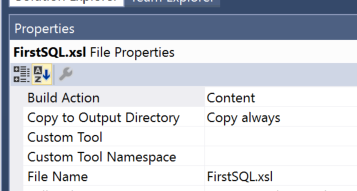 I ran in to trouble getting visual studio send a file with the install of the program. I finally got it with Content and “Copy always” properties.
 Andrew Lochbaum's Blog